Bluesky and personal data: self-hosting your own PDS
Bluesky is built on top of the AT Protocol, a decentralized protocol for large-scale social web applications. If you're using Bluesky like any other social network, with an account created on the official app or website, everything is hosted and controlled by Bluesky. Your data is hosted on Bluesky's servers, you're using Bluesky's relay to get posts, and you're viewing your feed with Bluesky's AppView.
But we can (almost) self-host all of Bluesky's infrastructure. So let's begin by hosting our own Personal Data Server. It's not that hard!

Ok, but why?
I really love Bluesky for many reasons, but I still hate the idea that a private company owned by private investors is hosting my personal data. Bluesky is not as decentralized as other federated networks like Mastodon, and it's mainly controlled by Bluesky. But the situation is evolving with projects like Blacksky or Northsky Social, or by using your own PDS.
To understand how Bluesky works, we need to define some elements of the AT Protocol and its core components:
- DID PLC Directory: It's like the phone book of the network. By reading the DNS TXT record
_atproto.user.bsky.social, we can get the DID of the user and then use the PLC directory to get the user's identitifier. For now this is the only service that is not self-hostable, but you can self-host a relay if you want. - Relay: It's like an aggregator of PDS that also caches data and send them as events on a websocket for anyone who wants to listen in. This can be self-hosted but it's really resource intensive.
- AppView: The application you use to see your feed, like bsky.app. You can build your own and add custom features.
- PDS: Where the user data is stored: posts, likes, blocks, pictures, ... Many alternative clients already exists!
By controlling your own PDS, you control your data and how it's backed up, migrated... You can still use the Bluesky App View to access your account. If Bluesky PDS is down, you can still post because you are not affected. If anything happens to Bluesky (hostile takeover?), you still own your data.
Let's self host
The Bluesky team made a lot of efforts to easily set up your own PDS. The official documentation is really clear and easy to follow and your PDS should be running in a couple of minutes. Follow it for the initial setup, but stop at "Verifying that your PDS is online and accessible" if you want to migrate your account.
The default setup is great if you have a server used only for hosting your PDS. In my case, a lot of things are hosted here and I'm already using Nginx as a reverse proxy. So while I've used the official setup to get everything ready, I edited the default /pds/compose.yaml file to my taste:
version: '3.9'
services:
  pds:
    container_name: pds
    image: ghcr.io/bluesky-social/pds:0.4
    restart: unless-stopped
    volumes:
      - type: bind
        source: /pds
        target: /pds
    env_file:
      - /pds/pds.env
    ports:
      - 4000:3000
  watchtower:
    container_name: watchtower
    image: containrrr/watchtower:latest
    network_mode: host
    volumes:
      - type: bind
        source: /var/run/docker.sock
        target: /var/run/docker.sock
    restart: unless-stopped
    environment:
      WATCHTOWER_CLEANUP: true
      WATCHTOWER_SCHEDULE: "@midnight"
Then a bit of Nginx configuration to set up the reverse proxy:
server {
  server_name pds.mewsse.pet;
  # don't forget to increase max body size
  # to prevent crash if your car file or blob are big!
  client_max_body_size 100m;

  location / {
    proxy_set_header Host $http_host;
    proxy_set_header X-Real-IP $remote_addr;
    proxy_set_header X-Forwarded-For $proxy_add_x_forwarded_for;
    proxy_set_header X-Forwarded-Proto $scheme;
    proxy_set_header Upgrade $http_upgrade;
    proxy_set_header Connection $connection_upgrade;

    proxy_http_version 1.1;
    proxy_pass http://127.0.0.1:4000;
  }

  # auto-validate any account on this PDS are "adults".
  # yep, you don't need to scan your face.
  location /xrpc/app.bsky.unspecced.getAgeAssuranceState {
    default_type application/json;
    return 200 '{"lastlnitiatedAt":"2025-07-14T14:23:44.254Z", "status":"assured"}';
  }
}
And to be ready to migrate your account, you will need an invite code from your all new PDS:
sudo pdsadmin create-invite-code
Now let's migrate
In this example, we will do it manually from our terminal, using goat, a CLI tool made to interact with the AT Protocol written in Go. Tools like ATPAirport can do this automatically for you and migrate your data from one PDS to another easily through a web interface.
First step, log in to your current Bluesky account with goat and request a PLC token to be able to migrate. You will receive it via an email sent to the address linked to your account:
goat account login -u $HANDLE -p $PASSWORD
goat account plc request-token
Now that everything is ready and running, you can migrate your account using the goat account migrate command:
goat account migrate \
  --pds-host $FULL_URL_OF_NEW_PDS \
  --invite-code $INVITE_CODE \
  --plc-token $PLC_TOKEN \
  --new-handle $HANDLE \
  --new-email $EMAIL \
  --new-password $NEW_PASSWORD
The migration can take several minutes, or even crash if something goes wrong, but should not result in any problems if it fails.
When the migration is done, goat will automatically disable the old account on the Bluesky PDS. If you use the same handle as your old account, nothing will change for anyone except you: you will need to log in with your own PDS on the App View, as the old account is now disabled on the Bluesky PDS.
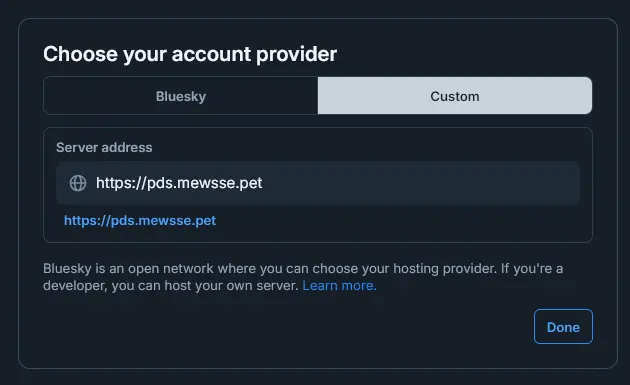
I didn't have any problems migrating both my accounts with more than 2k posts, but your mileage may vary. If you have any problems with the auto migration, @bnewbold.net has an excellent article on how to migrate manually with goat: https://whtwnd.com/bnewbold.net/3l5ii332pf32u
That's it, enjoy your own PDS! And don't forget to log out your old account on goat
goat logout
Bonus round: backups
Everything is stored in the /pds directory and all the databases use SQLite. A simple copy can be used as a backup. To prevent any issues, I suggest you to stop the PDS service before doing anything, that will prevent any locks on the databases or corrupted blobs.
This is my quick and dirty script to create a backup every day, in /etc/cron.daily:
#!/bin/bash

FILENAME = "/tmp/backup-$(date +'%d-%m-%Y-%H-%M-%S').tar.gz"
service pds stop
tar -cz -f ${FILENAME} /pds/
service pds start
scp -q ${FILENAME} user@host:/pds-backup/
rm ${FILENAME}
If anything happens to your server, you just have to install the service again and extract your backup!
Comments 🦋
Post a comment by replying to my Bluesky post!